Automate.
Mail Shepherd 3.0 (build 454) · Updated October 21, 2026
Automate is where Mail Shepherd works on its own while it’s open: Auto-Sweep runs Sweeps on a schedule, and Recent Changes shows what they did.
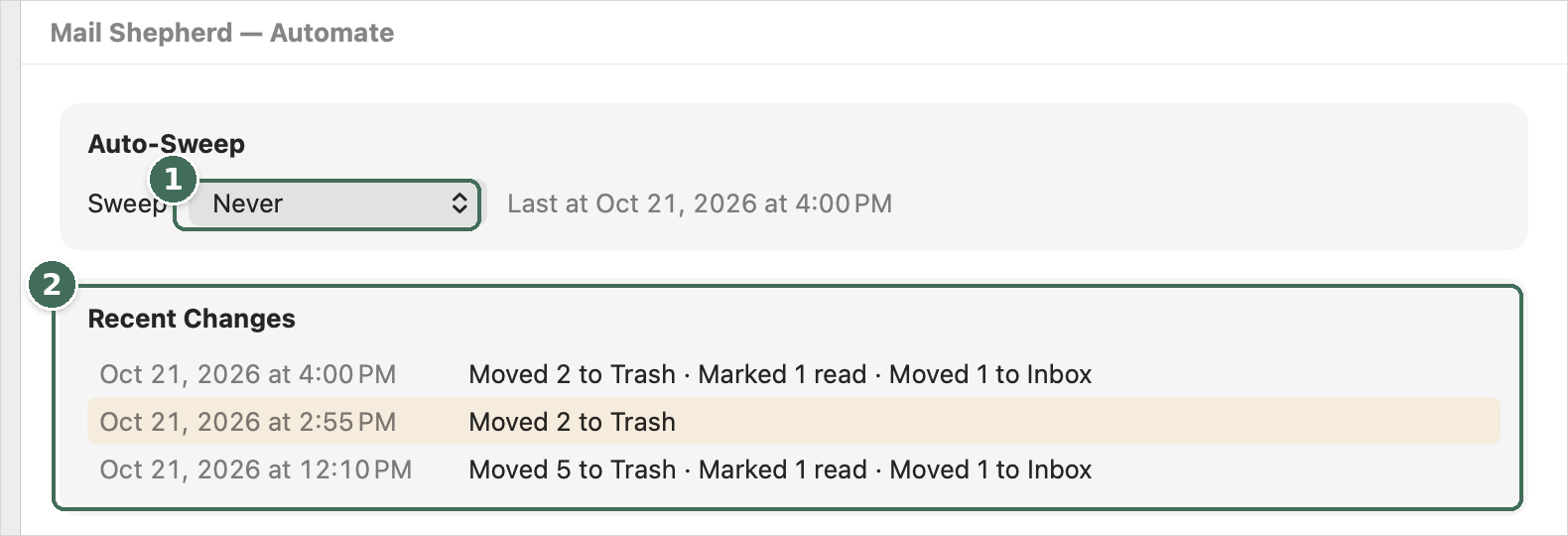
- How often Auto-Sweep runs, and when the last Sweep ran.
- Recent Changes: each Auto-Sweep that changed anything, newest first. Click one to see its counts.
Auto-Sweep
Choose how often to sweep from the menu: Never, Every minute, Every 5 minutes, Every 15 minutes or Every hour. An Auto-Sweep does exactly what clicking Sweep on the Sweep page does, and its results show there. Beside the menu, “Next in 4 min” counts down to the next one, and “Last at …” says when the last Sweep ran.
Auto-Sweep runs only while Mail Shepherd is open (see Open at Login on Setup). When a Sweep is due, it waits, showing “Next when Mail Shepherd is idle”, until:
- nothing else is running and no dialog is open,
- the Sweep, Automate, Review Blocked or Review Junk page is showing (not a message’s details), and
- you haven’t clicked, typed or scrolled in Mail Shepherd for 20 seconds.
It’s skipped until the next time when Mail isn’t open, Mail’s blocked list can’t be read, or Contacts access is off. Auto-Sweep never shows alerts: its problems go to the Action Log, and the Sweep page shows the warning icon.
Recent Changes
Lists the latest Auto-Sweeps that changed anything, newest first (up to 25, from the last two months), each with when it finished and what it did, such as “Moved 3 to Trash · Marked 2 read · Moved 1 to Inbox”. Auto-Sweeps that changed nothing aren’t listed; until one changes something, it says “No changes yet.”
Click a row to see that Sweep’s changes, message by message, from the Action Log: the Change (Marked Read, Moved to Trash, Moved to Inbox or Blocked Domain), Sender, Subject, Received and Mailbox. ↑ and ↓ show the Sweep above or below it; Done (Esc) goes back to Automate. Once the Action Log no longer has a Sweep’s entries (after Clear Log, or once they’re 12 weeks old), it says so.
Was this page helpful? Tell us.