Sweep.
Mail Shepherd 3.0 (build 454) · Updated October 21, 2026
Click Sweep to clean up Junk and Trash. It starts right away, without asking, and checks every message in Junk and Trash in every account: Trash first, then Junk. Then it looks for mail from your Blocked Domains in Junk, Trash and every Inbox.
- Trash: every unread message is marked read, so Trash shows no unread count.
- Junk from blocked senders (on Mail’s blocked list or Mail Shepherd’s Blocked Senders): marked read and moved to Trash.
- Junk from your contacts or an Allowed Domain: moved to your Inbox and marked not junk.
- Other junk: marked read and moved to Trash, marked junk, so it’s listed on Review Junk.
- Mail from Blocked Domains, in Junk, Trash or any Inbox: marked junk and read, and moved to Trash. Mail from your contacts isn’t caught by a Blocked Domain.
- A blocked sender always wins. A Sweep never deletes anything.
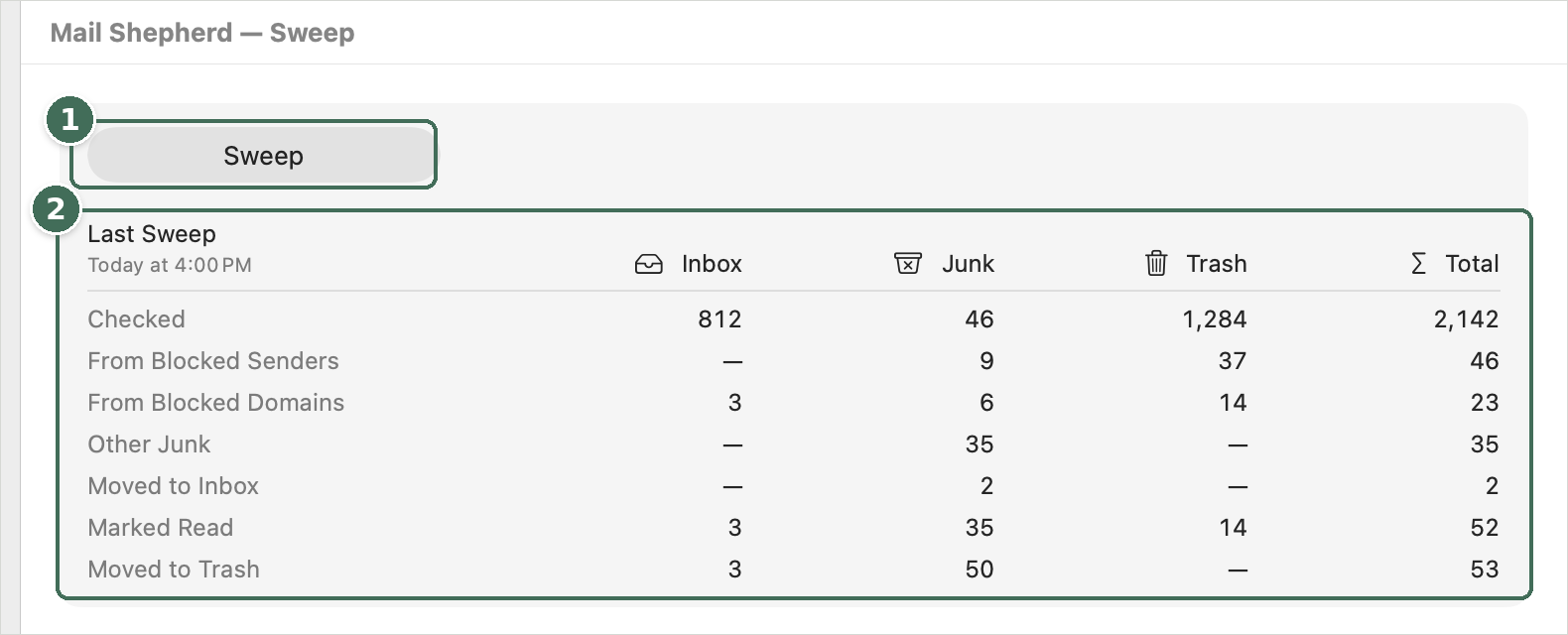
- Sweep starts a Sweep. While it runs, it becomes Stop.
- What the last Sweep found and did in each mailbox, and when it ran.
While it runs
Sweep turns into Stop (⌘.), with what it’s doing beside it, and the results fill in as each mailbox is handled. A Sweep doesn’t use Mail’s window, so you can keep using Mail. Stop ends it after the current step; what it did before then stays done, and the results show how far it got.
The results
The table shows the last Sweep, with its date, in columns for Inbox, Junk, Trash and Total: messages Checked, From Blocked Senders, From Blocked Domains and Other Junk, and what the Sweep did: Moved to Inbox, Marked Read and Moved to Trash. The Inbox column comes from the Blocked Domains check. The results stay until the next Sweep, including one that Auto-Sweep runs.
When it can’t run
- Sweep is dimmed while Mail isn’t open, while Mail’s blocked list can’t be read or Contacts access is off, and while Mail Shepherd is busy with something else. When Mail isn’t open, the page says “Open Mail to run a Sweep.” with Open Mail; Mail Shepherd never opens Mail by itself for a Sweep.
- When a required setting is off, the page says “Setup needs attention”, naming the rows to fix, with Open Setup.
- When a Sweep finishes with problems or stops with an error, an orange warning icon appears beside Sweep. Point at it to read the problem, or click it to open the Action Log.
Afterwards, review what it found on Review Blocked and Review Junk. To sweep on a schedule, see Automate.
Was this page helpful? Tell us.