Blocked Domains.
Mail Shepherd 3.0 (build 454) · Updated October 21, 2026
On the left are the Domains of Blocked Senders; on the right, your Blocked Domains. Every Sweep handles all mail from a Blocked Domain and its subdomains, from any address: in Junk, Trash and every Inbox, it’s marked junk and read and moved to Trash. Mail from your contacts is never caught by a Blocked Domain.
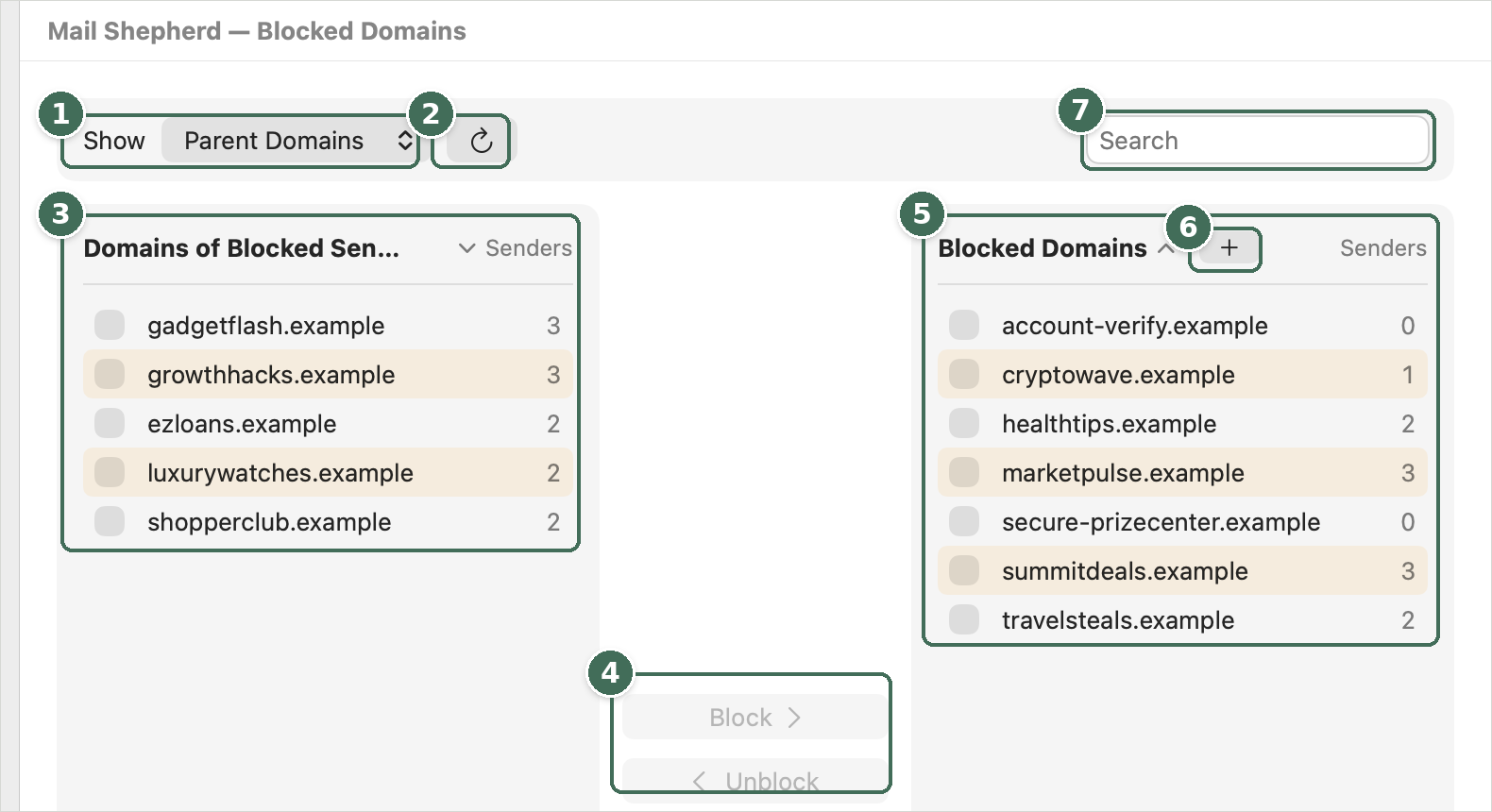
- Show switches between parent domains and exact domains.
- Refresh reads Mail’s blocked list again.
- Domains of senders you’ve blocked, with how many blocked senders use each.
- Block and Unblock move the checked domains.
- Your Blocked Domains.
- + adds a domain you type.
- Search both lists.
- The Show menu switches the left list between Parent Domains (subdomains combined, so mail.shop.example counts toward shop.example) and Exact Domains. The left list leaves out shared email providers such as gmail.com, mailing and hosting services, domains with only one blocked address, domains your contacts use, and domains that are already blocked.
- The Senders column counts the blocked addresses (in Mail or Mail Shepherd) at each domain. Click a column header to sort by it, and click it again to reverse the order.
- Check domains, then click Block or Unblock to move them across. Each button shows how many are checked, such as Block (2). + beside Blocked Domains adds a domain you type.
- Refresh reads Mail’s blocked list and your contacts again; while it reads, it turns into Stop (⌘.). The search box filters both lists.
Changes are saved at once, and the Review lists are matched again right away: a newly blocked domain’s messages move to Review Blocked, and the next Sweep handles its mail. A blocked sender is always blocked. If a domain is both blocked and allowed, the more specific entry wins: blocking mail.shop.example while allowing shop.example blocks mail from mail.shop.example.
Without Contacts access, the page is disabled and says “This page requires access to Contacts.” with Open Setup. If Mail’s blocked list can’t be read, the page says why, with Try Again and Open Setup. The lists can’t change while a Sweep or other work is running.
Was this page helpful? Tell us.